

Teapot Technical Support
Support FAQs
Can't Connect After Setup?
This is almost ALWAYS caused by an incorrect STATION ID, DEVICE ID, or TOKEN.
If none of these items correct the problem, open up Teapot Settings and tap or click on the View Log button at the top. This will open up Teapot's internal session log. Make sure you have Rapid Wind and Station enabled at the bottom. Watch the log for a minute or so to make sure it is gathering data. It updates in real time.
- Check to make sure you have no leading or trailing spaces for any of these values. These can be inadvertently added if you do a Copy/Paste to enter your values.
- Sometimes Weatherflow servers will not recognize your token, and generating a new token fixes the problem. We do not know why this happens as this is entirely a Weatherflow problem.
- Try rebooting your device. This often fixes the problem.
If none of these items correct the problem, open up Teapot Settings and tap or click on the View Log button at the top. This will open up Teapot's internal session log. Make sure you have Rapid Wind and Station enabled at the bottom. Watch the log for a minute or so to make sure it is gathering data. It updates in real time.
This step is important! Tap or click the Email to Support button at the bottom of the log, and send us your details. This sends us diagnostics and settings info we need to resolve the problem. By doing this, we can generally resolve your issue in a single email.
How do I set up the Teapot App?
This information has been moved here.
How do I interpret the display?
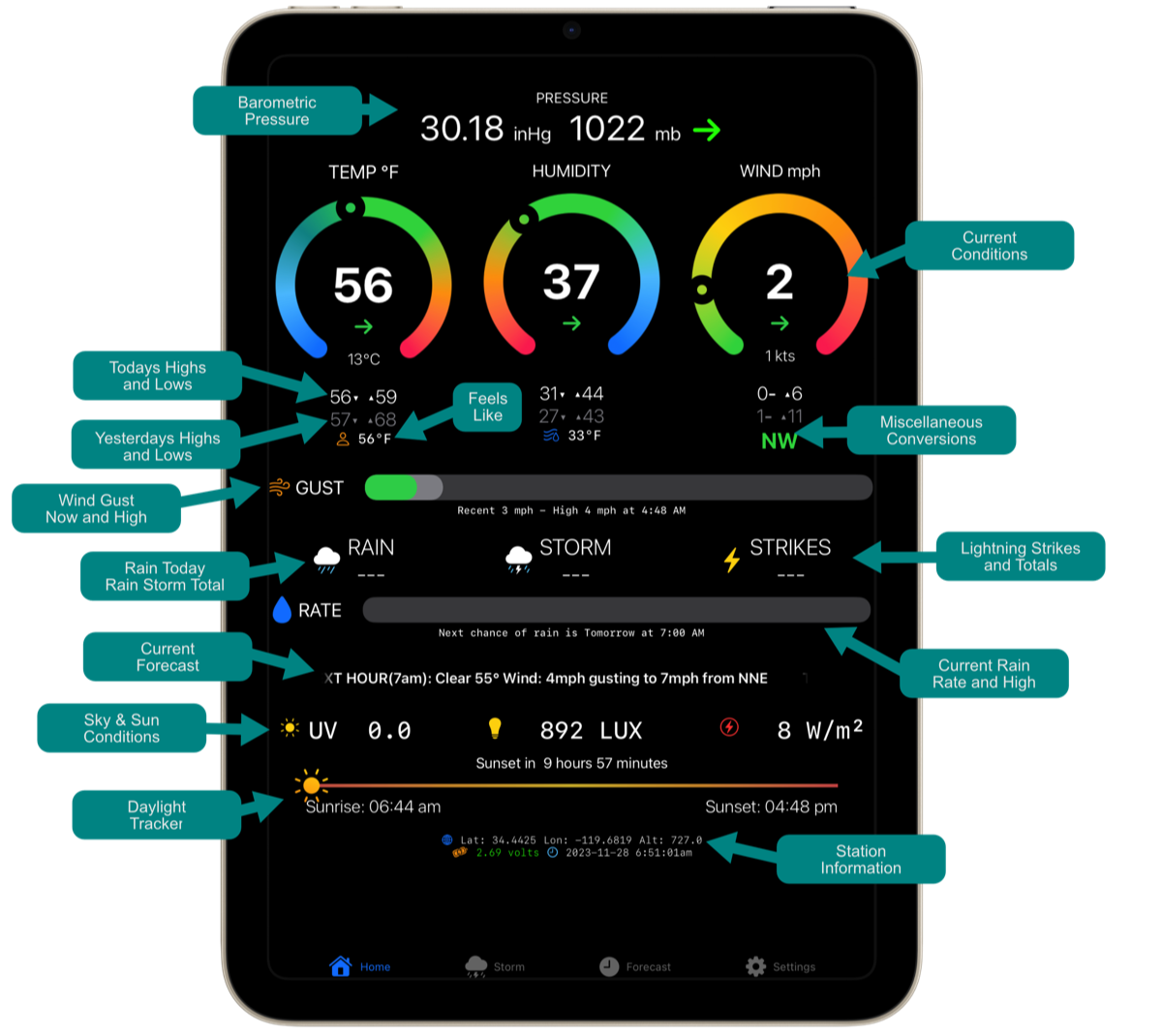
This diagram will help you understand the various display elements and what they mean.
Please note that the GUST and RATE gauges show current values as well as the high values displayed in a lighter gray color.
Please note that the GUST and RATE gauges show current values as well as the high values displayed in a lighter gray color.
How do I use the Rain Calibration feature?
Tempest weather stations utilize haptic raindrop detectors. In other words, they "listen"to the sounds and vibrations rainfall generate when they strike the top of the unit. Each installation is unique, and the type of rain you normally receive can vary considerably.
By itself, the Tempest can use two ways to calculate your rainfall. Raw data reports exactly what your Tempest reports. NearCast is an alternate technique the Tempest can use that basically averages reported rainfall from a number of stations in your geographical area.
Currently, Teapot uses raw data as reported by your Tempest alone. Some users prefer this method over NearCast.
Because this technique is sometimes inaccurate, we included a Rain Calibration feature to help display more accurate results. To calibrate your rainfall reports, you will need to compare your Tempest reports with a known accurate rain gauge. You may have another weather station you can compare with, or you can simply purchase a plastic or glass gauge from your local hardware store.
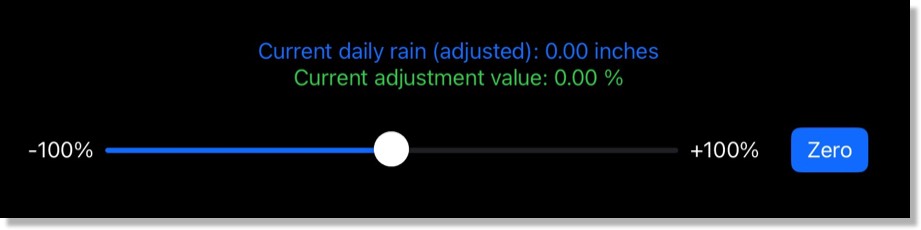
The image below shows the Teapot calibration tool. On the top line, you will see what your Tempest is reporting. If this does not match your readings from a known accurate rain gauge, you can adjust the slider until the adjusted total matches your rain gauge readings. After calibrating, rainfall amounts displayed by Teapot will be adjusted.accordingly. You may want to repeat the calibration process a few times until you are satisfied with the readings displayed by Teapot.
Note: Calibration does not change your raw data. It only changes the readings shown in the Teapot app.
By itself, the Tempest can use two ways to calculate your rainfall. Raw data reports exactly what your Tempest reports. NearCast is an alternate technique the Tempest can use that basically averages reported rainfall from a number of stations in your geographical area.
Currently, Teapot uses raw data as reported by your Tempest alone. Some users prefer this method over NearCast.
Because this technique is sometimes inaccurate, we included a Rain Calibration feature to help display more accurate results. To calibrate your rainfall reports, you will need to compare your Tempest reports with a known accurate rain gauge. You may have another weather station you can compare with, or you can simply purchase a plastic or glass gauge from your local hardware store.
The image below shows the Teapot calibration tool. On the top line, you will see what your Tempest is reporting. If this does not match your readings from a known accurate rain gauge, you can adjust the slider until the adjusted total matches your rain gauge readings. After calibrating, rainfall amounts displayed by Teapot will be adjusted.accordingly. You may want to repeat the calibration process a few times until you are satisfied with the readings displayed by Teapot.
Note: Calibration does not change your raw data. It only changes the readings shown in the Teapot app.
Can I use a different radar map?
Sure, we added support for user selected radar maps. The default maps are Apple Maps and open source radar overlays.
Say you wanted to use Windy as your radar map source. Here is how you do that:
1) In the app, tap on Settings and select Radar Map Selection.
2) In the URL field enter the following:
https://embed.windy.com/embed2.html?lat=\(latitude)&lon=\(longitude)&detailLat=\(latitude)&detailLon=
\(longitude)&zoom=7&level=surface&overlay=radar&product=radar&menu=&message=&marker=&calendar=now
&pressure=&type=map&location=coordinates&detail=&metricWind=default&metricTemp=default&radarRange=-1
⚠️ Important! URLs for weather maps can be exceedingly long. Take extra care to make sure you do not have extra spaces or carriage returns in the URL if you are pasting it in.
This will replace the default map with a Windy map and it will be centered on your location.
You can use any other map that offers an embeddable radar map. There are a couple of rules to follow to get them working properly.
Somewhere in the URL you will see a latitude value and a longitude value. For a Windy map, you will see &lat= and &lon=. Immediately after these field description, you will see a number like 34.1234500 and -118.126500. You replace the numbers with \(latitude) and \(longitude) respectively. Notice the green sections in the example above.
Don't worry if that sounds confusing, if you find an embeddable map you want to use, just let us know. We'll get the correct value for the URL for you.
Say you wanted to use Windy as your radar map source. Here is how you do that:
1) In the app, tap on Settings and select Radar Map Selection.
2) In the URL field enter the following:
https://embed.windy.com/embed2.html?lat=\(latitude)&lon=\(longitude)&detailLat=\(latitude)&detailLon=
\(longitude)&zoom=7&level=surface&overlay=radar&product=radar&menu=&message=&marker=&calendar=now
&pressure=&type=map&location=coordinates&detail=&metricWind=default&metricTemp=default&radarRange=-1
⚠️ Important! URLs for weather maps can be exceedingly long. Take extra care to make sure you do not have extra spaces or carriage returns in the URL if you are pasting it in.
This will replace the default map with a Windy map and it will be centered on your location.
You can use any other map that offers an embeddable radar map. There are a couple of rules to follow to get them working properly.
Somewhere in the URL you will see a latitude value and a longitude value. For a Windy map, you will see &lat= and &lon=. Immediately after these field description, you will see a number like 34.1234500 and -118.126500. You replace the numbers with \(latitude) and \(longitude) respectively. Notice the green sections in the example above.
Don't worry if that sounds confusing, if you find an embeddable map you want to use, just let us know. We'll get the correct value for the URL for you.
Troubleshooting
Teapot is not updating.
This the most frequently reported problem we have seen so far. There are a couple of things to keep in mind when troubleshooting this problem.
Your Tempest Weather System has 2 major components. The first one is the Tempest Weather Station itself. That is the device you install outdoors. The second component is the Tempest Weather Station Hub. The Hub is the device you use indoors to receive readings from your outdoor Tempest weather station.
Teapot now uses WebSockets which also you to receive observations in real time no matter where you are. You don't need to make any changes to your current setup as long as you have your Station ID, Device ID and Token configured in your settings.
If it is not connecting and receiving data, check your Station ID, Device ID and Token.
This the most frequently reported problem we have seen so far. There are a couple of things to keep in mind when troubleshooting this problem.
Your Tempest Weather System has 2 major components. The first one is the Tempest Weather Station itself. That is the device you install outdoors. The second component is the Tempest Weather Station Hub. The Hub is the device you use indoors to receive readings from your outdoor Tempest weather station.
Teapot now uses WebSockets which also you to receive observations in real time no matter where you are. You don't need to make any changes to your current setup as long as you have your Station ID, Device ID and Token configured in your settings.
If it is not connecting and receiving data, check your Station ID, Device ID and Token.
Teapot Is reporting different rain totals than the official Tempest app.
There can be a couple of reasons for this.
1) You have Nearcast on. This causes the rainfall do be displayed after some manipulation has been performed on Tempests servers. Teapot displays raw data as received directly from the station.
2) Your Teapot device may have not seen a data packet from your Tempest hub. WiFi is not perfect and sometime drops out for no apparent reason. WiFi is also sensitive to interference from other networks nearby. The Tempest Hub uses the older 2.4 GhZ WiFi band. That band has only 11 channels of which only 4-6 channels are really usable. This means you are competing for that bandwidth with other nearby networks.
There can be a couple of reasons for this.
1) You have Nearcast on. This causes the rainfall do be displayed after some manipulation has been performed on Tempests servers. Teapot displays raw data as received directly from the station.
2) Your Teapot device may have not seen a data packet from your Tempest hub. WiFi is not perfect and sometime drops out for no apparent reason. WiFi is also sensitive to interference from other networks nearby. The Tempest Hub uses the older 2.4 GhZ WiFi band. That band has only 11 channels of which only 4-6 channels are really usable. This means you are competing for that bandwidth with other nearby networks.
Need more help?
If you need support, contact us below…